C++ Lambda Expressions: Complete Guide to Closures & Captures 2026
Table of Contents
1. What Are Lambda Expressions?
Lambda expressions, introduced in C++11, let you define anonymous functions inline — right where you need them. They’re the reason STL algorithms became practical to use. Before lambdas, you had to write separate function objects or use clunky function pointers.
// Before lambdas: need a separate functor
struct IsEven {
    bool operator()(int n) const { return n % 2 == 0; }
};
auto it = std::find_if(v.begin(), v.end(), IsEven{});

// With lambdas: inline and clear
auto it = std::find_if(v.begin(), v.end(),
                        [](int n) { return n % 2 == 0; });
2. Lambda Syntax Breakdown
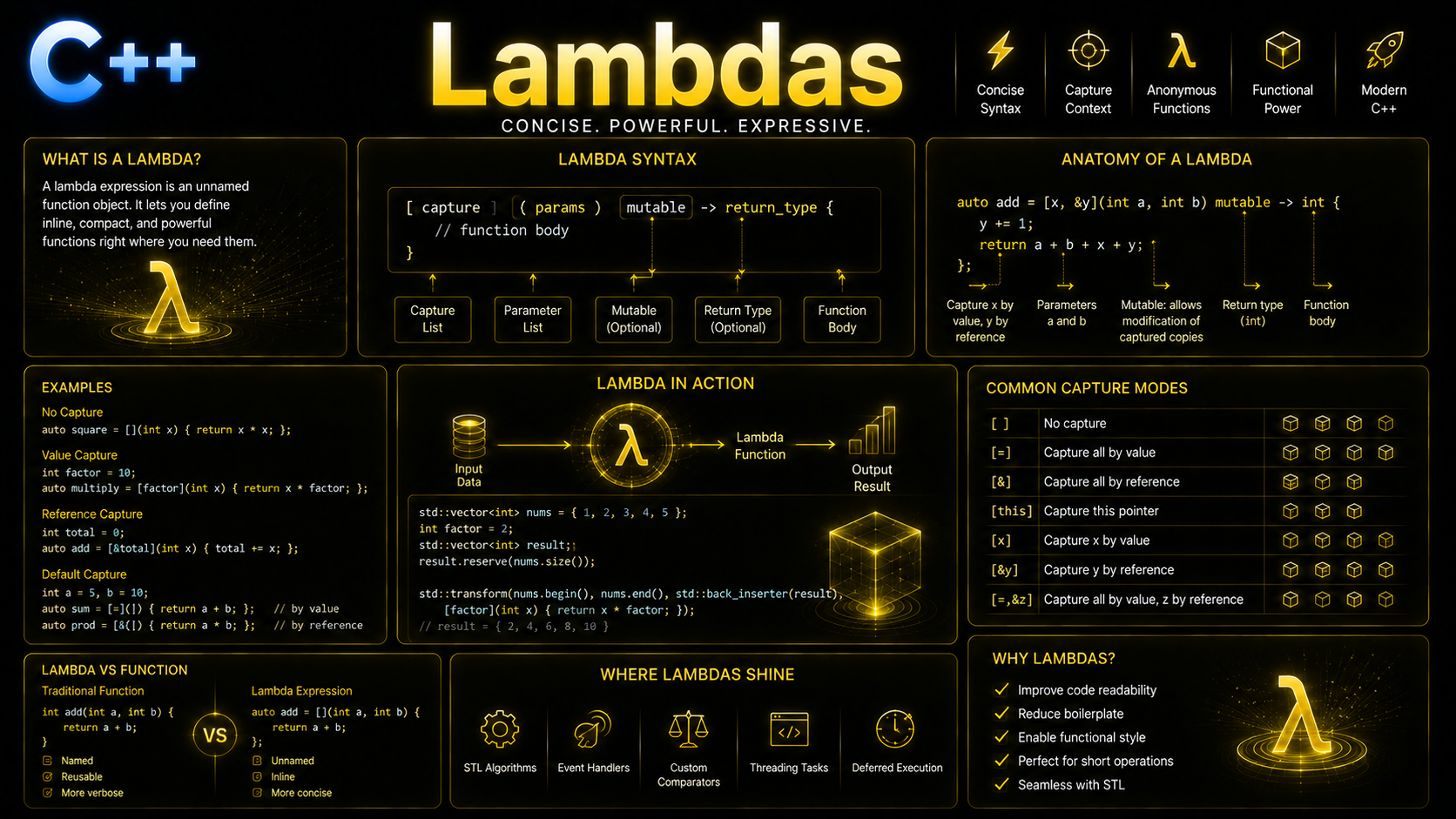
Every lambda has this structure:
[captures](parameters) specifiers -> return_type { body }

// Minimal lambda
auto greet = []() { std::cout << "Hello!\n"; };
greet(); // prints "Hello!"

// With parameters
auto add = [](int a, int b) { return a + b; };
int result = add(3, 4); // 7

// With explicit return type
auto divide = [](double a, double b) -> double {
    if (b == 0) return 0.0;
    return a / b;
};

// Parameters with default values (C++14)
auto power = [](double base, int exp = 2) {
    double result = 1.0;
    for (int i = 0; i < exp; ++i) result *= base;
    return result;
};
power(3);    // 9.0
power(2, 10); // 1024.0
The parts:
- [captures] — what variables from the enclosing scope the lambda can access
- (parameters) — input parameters (can be omitted if empty in C++23)
- specifiers —
mutable,constexpr,noexcept, etc. - -> return_type — explicit return type (usually deduced automatically)
- { body } — the function body
3. Capture Modes Explained
Captures let lambdas access variables from the surrounding scope. This is what makes them closures:
#include <iostream>
#include <vector>
#include <algorithm>

int main() {
    int threshold = 50;
    std::string prefix = "Value: ";

    // [=] capture all by value (copy)
    auto byVal = [=]() {
        std::cout << prefix << threshold << "\n";
        // threshold and prefix are copies
    };

    // [&] capture all by reference
    int count = 0;
    auto byRef = [&](int n) {
        if (n > threshold) ++count; // modifies original count
    };

    // [x] capture specific variable by value
    auto specific = [threshold](int n) { return n > threshold; };

    // [&x] capture specific variable by reference
    auto specRef = [&count](int n) { count += n; };

    // Mix captures
    auto mixed = [threshold, &count](int n) {
        if (n > threshold) ++count;
        // threshold is a copy, count is a reference
    };

    // [=, &x] all by value except x by reference
    auto mostVal = [=, &count]() {
        std::cout << prefix << threshold << "\n";
        ++count;
    };

    // [&, x] all by reference except x by value
    auto mostRef = [&, threshold]() {
        ++count; // reference
        // threshold is a copy here
    };

    std::vector<int> nums = {10, 60, 30, 80, 45, 90};
    std::for_each(nums.begin(), nums.end(), byRef);
    std::cout << "Count above " << threshold << ": " << count << std::endl;
}std::function or returned from functions.
// DANGEROUS: dangling reference
std::function<int()> makeCounter() {
    int count = 0;
    return [&count]() { return ++count; }; // BUG: count destroyed!
}

// SAFE: capture by value
std::function<int()> makeCounter() {
    int count = 0;
    return [count]() mutable { return ++count; }; // OK: owns copy
}
4. Mutable Lambdas
By default, a lambda’s operator() is const, meaning captured-by-value variables can’t be modified. Use mutable to allow modification:
#include <iostream>
#include <functional>

int main() {
    int seed = 0;

    // Error without mutable:
    // auto counter = [seed]() { return ++seed; }; // won't compile

    // With mutable: can modify the captured copy
    auto counter = [seed]() mutable { return ++seed; };

    std::cout << counter() << "\n"; // 1
    std::cout << counter() << "\n"; // 2
    std::cout << counter() << "\n"; // 3
    std::cout << "Original seed: " << seed << "\n"; // still 0

    // Practical: stateful callback
    auto makeAccumulator = [](double initial) {
        return [total = initial](double val) mutable {
            total += val;
            return total;
        };
    };

    auto acc = makeAccumulator(100.0);
    std::cout << acc(10) << "\n";  // 110
    std::cout << acc(25) << "\n";  // 135
}
5. Generic Lambdas (C++14/20)
Use auto parameters to create lambdas that work with any type:
#include <iostream>
#include <string>
#include <vector>

int main() {
    // C++14: auto parameters (generic lambda)
    auto print = [](const auto& x) { std::cout << x << "\n"; };
    print(42);          // int
    print(3.14);        // double
    print("hello");     // const char*

    // Generic comparison
    auto greater = [](const auto& a, const auto& b) { return a > b; };
    std::cout << greater(5, 3) << "\n";          // true
    std::cout << greater(1.5, 2.5) << "\n";      // false

    // C++20: template lambda syntax
    auto typedPrint = []<typename T>(const std::vector<T>& vec) {
        for (const auto& elem : vec)
            std::cout << elem << " ";
        std::cout << "\n";
    };

    typedPrint(std::vector<int>{1, 2, 3});
    typedPrint(std::vector<std::string>{"a", "b", "c"});

    // C++20: constrained template lambda
    auto addNumbers = []<typename T>(T a, T b) requires std::integral<T> {
        return a + b;
    };
    addNumbers(1, 2);     // OK
    // addNumbers(1.0, 2.0); // Error: not integral
}
6. Immediately Invoked Lambdas
Call a lambda right where you define it — useful for complex initialization:
#include <iostream>
#include <vector>
#include <algorithm>

int main() {
    // IIFE for const initialization with complex logic
    const auto config = []() {
        struct Config {
            int port;
            std::string host;
            bool debug;
        };
        // Could read from file, env vars, etc.
        Config c;
        c.port = 8080;
        c.host = "localhost";
        c.debug = true;
        return c;
    }(); // Note the () — invokes immediately

    std::cout << config.host << ":" << config.port << "\n";

    // IIFE to initialize const with conditional logic
    int input = 42;
    const std::string category = [&]() {
        if (input < 0) return "negative";
        if (input == 0) return "zero";
        if (input < 100) return "small";
        return "large";
    }();

    std::cout << "Category: " << category << "\n";
}
7. Lambdas with STL Algorithms
Lambdas unlock the full power of the STL:
#include <algorithm>
#include <numeric>
#include <vector>
#include <string>
#include <iostream>
#include <map>

struct Employee {
    std::string name;
    std::string dept;
    double salary;
};

int main() {
    std::vector<Employee> team = {
        {"Alice", "Engineering", 120000},
        {"Bob", "Marketing", 85000},
        {"Charlie", "Engineering", 135000},
        {"Diana", "Marketing", 92000},
        {"Eve", "Engineering", 110000}
    };

    // Sort by salary descending
    std::sort(team.begin(), team.end(),
              [](const Employee& a, const Employee& b) {
                  return a.salary > b.salary;
              });

    // Filter engineers
    std::vector<Employee> engineers;
    std::copy_if(team.begin(), team.end(), std::back_inserter(engineers),
                 [](const Employee& e) { return e.dept == "Engineering"; });

    // Calculate average engineering salary
    double avgSalary = std::accumulate(
        engineers.begin(), engineers.end(), 0.0,
        [](double sum, const Employee& e) { return sum + e.salary; }
    ) / engineers.size();

    // Find who earns closest to average
    auto closest = std::min_element(engineers.begin(), engineers.end(),
        [avgSalary](const Employee& a, const Employee& b) {
            return std::abs(a.salary - avgSalary) < std::abs(b.salary - avgSalary);
        });

    // Count high earners
    auto highEarners = std::count_if(team.begin(), team.end(),
        [](const Employee& e) { return e.salary > 100000; });

    std::cout << "Avg engineering salary: $" << avgSalary << "\n";
    std::cout << "Closest to avg: " << closest->name << "\n";
    std::cout << "High earners: " << highEarners << std::endl;
}
8. Advanced Lambda Patterns
Recursive Lambdas
#include <functional>
#include <iostream>

int main() {
    // Use std::function for recursive lambdas
    std::function<int(int)> factorial = [&factorial](int n) -> int {
        return n <= 1 ? 1 : n * factorial(n - 1);
    };
    std::cout << factorial(5) << "\n"; // 120

    // C++23 deducing this (no std::function overhead)
    // auto factorial = [](this auto& self, int n) -> int {
    //     return n <= 1 ? 1 : n * self(n - 1);
    // };
}
Lambda as Comparator in Containers
#include <set>
#include <map>
#include <iostream>

int main() {
    // Lambda as set comparator
    auto caseInsensitive = [](const std::string& a, const std::string& b) {
        return std::lexicographical_compare(
            a.begin(), a.end(), b.begin(), b.end(),
            [](char c1, char c2) { return tolower(c1) < tolower(c2); });
    };

    std::set<std::string, decltype(caseInsensitive)> names(caseInsensitive);
    names.insert("Alice");
    names.insert("alice"); // won't insert — same as "Alice"
    names.insert("Bob");

    for (const auto& n : names) std::cout << n << " ";
    // Output: Alice Bob
}
Storing Lambdas
#include <functional>
#include <vector>

int main() {
    // auto for single lambda
    auto square = [](int n) { return n * n; };

    // std::function for type-erased storage
    std::function<int(int)> op = square;
    op = [](int n) { return n * 2; }; // can reassign

    // Vector of callbacks
    std::vector<std::function<void()>> tasks;
    tasks.push_back([]() { std::cout << "Task 1\n"; });
    tasks.push_back([]() { std::cout << "Task 2\n"; });

    for (auto& task : tasks) task();
}
9. Practice Exercises
Exercise 1: Lambda Calculator
Create a map of string-to-lambda that maps operator names ("+", "-", "*", "/") to lambdas performing those operations.
Exercise 2: Event System
Build a simple event system using std::vector<std::function> where you can register lambda callbacks and fire events.
Exercise 3: Pipeline Builder
Create a function that takes a vector and a variable number of transform lambdas, applying them in sequence.
What's Next?
With lambdas mastered, you're ready to learn auto & Type Deduction — understanding how the compiler deduces types in modern C++, which works hand-in-hand with lambdas and templates.
Return to the C++ Learning Roadmap to continue your journey.