C++ Transform, Accumulate & More: STL Algorithms Deep Dive 2026
Table of Contents
1. Beyond sort() and find()
In the previous lesson on sorting and searching, you learned the most common STL algorithms. But the <algorithm> and <numeric> headers contain over 100 algorithms that can replace manual loops, making your code shorter, safer, and often faster.
This lesson covers the algorithms you’ll use daily — transforming data, reducing collections to single values, filtering elements, and finding extremes. These are the building blocks of expressive, modern C++.
2. std::transform — Map Operations
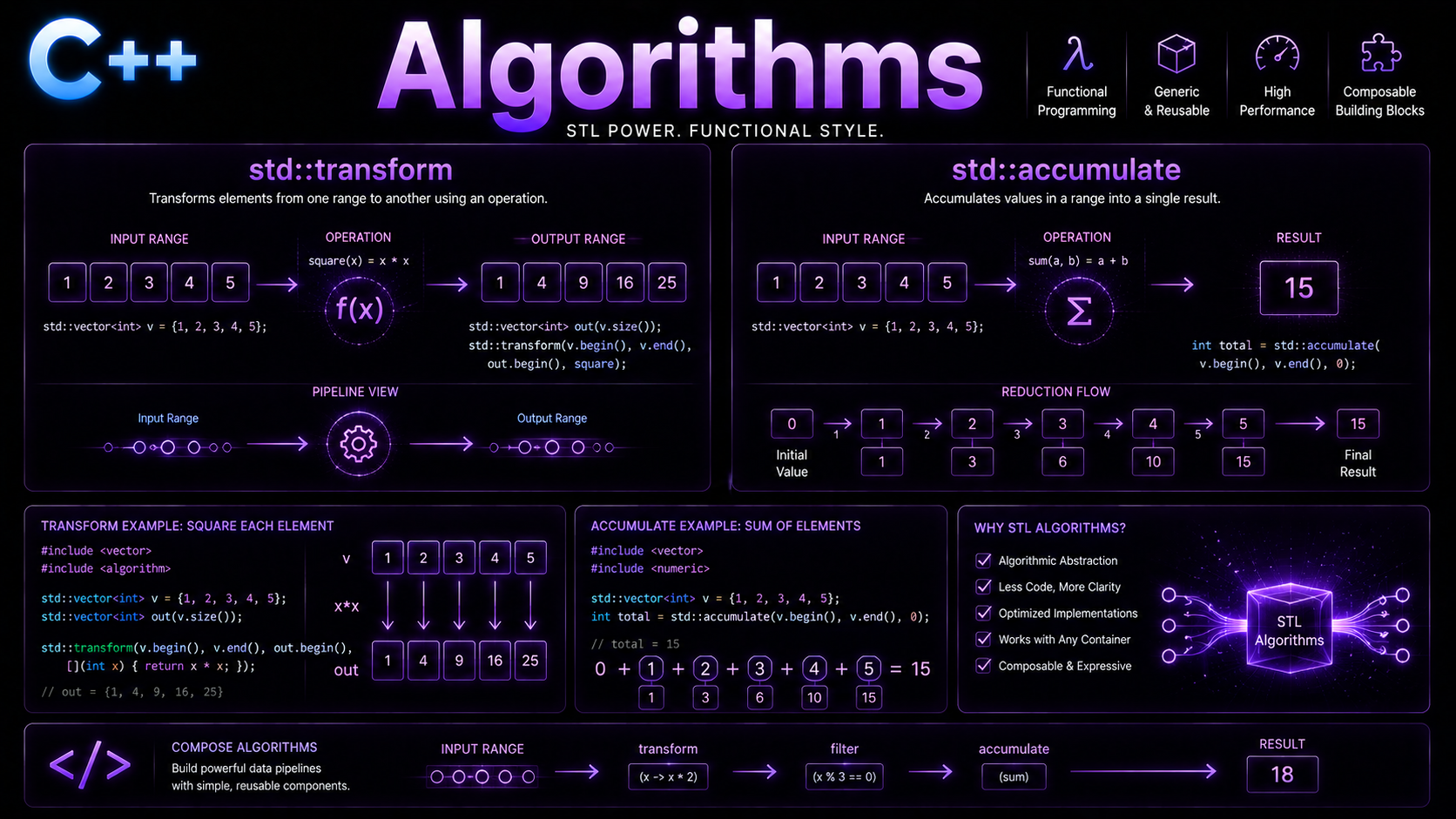
std::transform applies a function to each element and stores the result. It’s the C++ equivalent of “map” in functional programming:
#include <algorithm>
#include <vector>
#include <string>
#include <iostream>
#include <cctype>

int main() {
    // Unary transform: square each number
    std::vector<int> nums = {1, 2, 3, 4, 5};
    std::vector<int> squares(nums.size());

    std::transform(nums.begin(), nums.end(), squares.begin(),
                   [](int n) { return n * n; });
    // squares: {1, 4, 9, 16, 25}

    // Transform in-place
    std::transform(nums.begin(), nums.end(), nums.begin(),
                   [](int n) { return n * 2; });
    // nums: {2, 4, 6, 8, 10}

    // Binary transform: add two vectors element-wise
    std::vector<int> a = {1, 2, 3};
    std::vector<int> b = {10, 20, 30};
    std::vector<int> sums(3);

    std::transform(a.begin(), a.end(), b.begin(), sums.begin(),
                   [](int x, int y) { return x + y; });
    // sums: {11, 22, 33}

    // Transform strings to uppercase
    std::string text = "hello world";
    std::transform(text.begin(), text.end(), text.begin(),
                   [](char c) { return std::toupper(c); });
    // text: "HELLO WORLD"

    for (int s : squares) std::cout << s << " ";
    std::cout << "\n" << text << std::endl;
}
Key points about std::transform:
- The output range must be pre-allocated (or use
std::back_inserter) - Unary form takes one input range; binary form takes two
- Can transform in-place when output iterator equals input begin
- Returns iterator past the last transformed element
3. std::accumulate — Fold/Reduce
std::accumulate (from <numeric>) reduces a range to a single value by repeatedly applying a binary operation:
#include <numeric>
#include <vector>
#include <string>
#include <iostream>

int main() {
    std::vector<int> nums = {1, 2, 3, 4, 5};

    // Sum (default operation is +)
    int sum = std::accumulate(nums.begin(), nums.end(), 0);
    // sum = 15

    // Product
    int product = std::accumulate(nums.begin(), nums.end(), 1,
                                   [](int acc, int val) { return acc * val; });
    // product = 120

    // Concatenate strings
    std::vector<std::string> words = {"Hello", " ", "World", "!"};
    std::string sentence = std::accumulate(
        words.begin(), words.end(), std::string{},
        [](const std::string& acc, const std::string& w) {
            return acc + w;
        });
    // sentence = "Hello World!"

    // Find maximum using accumulate
    int maxVal = std::accumulate(nums.begin(), nums.end(), nums[0],
                                  [](int a, int b) { return std::max(a, b); });

    // Count elements matching condition
    int evens = std::accumulate(nums.begin(), nums.end(), 0,
                                 [](int count, int val) {
                                     return count + (val % 2 == 0 ? 1 : 0);
                                 });

    std::cout << "Sum: " << sum << "\n";
    std::cout << "Product: " << product << "\n";
    std::cout << "Sentence: " << sentence << "\n";
    std::cout << "Max: " << maxVal << "\n";
    std::cout << "Evens: " << evens << std::endl;
}std::accumulate(v.begin(), v.end(), 0) uses int arithmetic even if v contains double. Use 0.0 for floating-point sums.
C++17 added std::reduce which is similar but allows parallel execution:
#include <numeric>
#include <execution>

// Parallel sum (C++17)
int sum = std::reduce(std::execution::par, nums.begin(), nums.end(), 0);
// Note: binary op must be associative and commutative for parallel reduce
4. std::for_each — Apply to All
std::for_each applies a function to every element. Unlike range-for loops, it works with iterator pairs and returns the function object:
#include <algorithm>
#include <vector>
#include <iostream>

int main() {
    std::vector<int> nums = {1, 2, 3, 4, 5};

    // Print each element
    std::for_each(nums.begin(), nums.end(),
                  [](int n) { std::cout << n << " "; });
    std::cout << "\n";

    // Modify in-place (pass by reference)
    std::for_each(nums.begin(), nums.end(),
                  [](int& n) { n *= 10; });
    // nums: {10, 20, 30, 40, 50}

    // Use a stateful functor to accumulate info
    struct Stats {
        int count = 0;
        double sum = 0;
        void operator()(int n) { ++count; sum += n; }
    };

    Stats result = std::for_each(nums.begin(), nums.end(), Stats{});
    std::cout << "Count: " << result.count
              << ", Avg: " << result.sum / result.count << std::endl;

    // for_each on a sub-range
    std::for_each(nums.begin(), nums.begin() + 3,
                  [](int n) { std::cout << n << " "; });
    // Output: 10 20 30
}
C++17 added std::for_each_n which processes exactly N elements:
std::for_each_n(nums.begin(), 3, [](int& n) { n += 1; });5. std::copy_if & std::remove_if
These algorithms filter elements — copy_if copies matching elements to a new container, while remove_if shuffles non-matching elements to the end:
#include <algorithm>
#include <vector>
#include <iostream>
#include <iterator>

int main() {
    std::vector<int> nums = {1, 2, 3, 4, 5, 6, 7, 8, 9, 10};

    // copy_if: filter evens into a new vector
    std::vector<int> evens;
    std::copy_if(nums.begin(), nums.end(), std::back_inserter(evens),
                 [](int n) { return n % 2 == 0; });
    // evens: {2, 4, 6, 8, 10}

    // remove_if + erase (the erase-remove idiom)
    std::vector<int> data = {1, -2, 3, -4, 5, -6};
    auto newEnd = std::remove_if(data.begin(), data.end(),
                                  [](int n) { return n < 0; });
    data.erase(newEnd, data.end());
    // data: {1, 3, 5}

    // C++20 std::erase_if simplifies this:
    std::vector<int> vals = {10, 15, 20, 25, 30};
    std::erase_if(vals, [](int n) { return n > 20; });
    // vals: {10, 15, 20}

    // copy_n: copy first N elements
    std::vector<int> first3;
    std::copy_n(nums.begin(), 3, std::back_inserter(first3));
    // first3: {1, 2, 3}

    // partition: reorder so predicate-true elements come first
    std::vector<int> mixed = {5, 1, 4, 2, 3};
    auto pivot = std::partition(mixed.begin(), mixed.end(),
                                 [](int n) { return n <= 3; });
    // Elements <= 3 now before pivot, > 3 after
    // e.g., {1, 2, 3, 5, 4} (relative order not preserved)

    for (int e : evens) std::cout << e << " ";
    std::cout << std::endl;
}std::remove_if doesn’t actually remove elements — it moves non-matching elements to the front and returns an iterator to the new logical end. You must call erase() to actually shrink the container. C++20’s std::erase_if does both in one step.
6. std::min_element, max_element, minmax
Finding extreme values without manual loops:
#include <algorithm>
#include <vector>
#include <iostream>

struct Student {
    std::string name;
    double gpa;
};

int main() {
    std::vector<int> nums = {42, 17, 93, 5, 68};

    auto minIt = std::min_element(nums.begin(), nums.end());
    auto maxIt = std::max_element(nums.begin(), nums.end());
    std::cout << "Min: " << *minIt << " at index "
              << std::distance(nums.begin(), minIt) << "\n";
    std::cout << "Max: " << *maxIt << "\n";

    // minmax_element: find both in one pass (more efficient)
    auto [lo, hi] = std::minmax_element(nums.begin(), nums.end());
    std::cout << "Range: [" << *lo << ", " << *hi << "]\n";

    // With custom comparator
    std::vector<Student> students = {
        {"Alice", 3.8}, {"Bob", 3.2}, {"Charlie", 3.95}
    };

    auto best = std::max_element(students.begin(), students.end(),
                                  [](const Student& a, const Student& b) {
                                      return a.gpa < b.gpa;
                                  });
    std::cout << "Top student: " << best->name
              << " (GPA: " << best->gpa << ")\n";

    // std::clamp (C++17): constrain value to range
    int value = 150;
    int clamped = std::clamp(value, 0, 100);
    std::cout << "Clamped: " << clamped << std::endl; // 100
}
7. Numeric Algorithms
The <numeric> header has powerful algorithms for mathematical operations:
#include <numeric>
#include <vector>
#include <iostream>

int main() {
    // iota: fill with incrementing values
    std::vector<int> seq(10);
    std::iota(seq.begin(), seq.end(), 1);
    // seq: {1, 2, 3, 4, 5, 6, 7, 8, 9, 10}

    // partial_sum: running total
    std::vector<int> running(seq.size());
    std::partial_sum(seq.begin(), seq.end(), running.begin());
    // running: {1, 3, 6, 10, 15, 21, 28, 36, 45, 55}

    // adjacent_difference
    std::vector<int> data = {1, 4, 9, 16, 25};
    std::vector<int> diffs(data.size());
    std::adjacent_difference(data.begin(), data.end(), diffs.begin());
    // diffs: {1, 3, 5, 7, 9}

    // inner_product (dot product)
    std::vector<double> a = {1.0, 2.0, 3.0};
    std::vector<double> b = {4.0, 5.0, 6.0};
    double dot = std::inner_product(a.begin(), a.end(), b.begin(), 0.0);
    // dot = 1*4 + 2*5 + 3*6 = 32.0

    // C++17: inclusive_scan and exclusive_scan
    // (parallel-friendly versions of partial_sum)
    std::vector<int> inclusive(seq.size());
    std::inclusive_scan(seq.begin(), seq.end(), inclusive.begin());
    // Same as partial_sum for addition

    // C++17: transform_reduce (map + reduce in one)
    std::vector<int> prices = {10, 20, 30};
    std::vector<int> quantities = {2, 3, 1};
    int total = std::transform_reduce(
        prices.begin(), prices.end(), quantities.begin(), 0);
    // total = 10*2 + 20*3 + 30*1 = 110

    std::cout << "Dot product: " << dot << "\n";
    std::cout << "Total: " << total << std::endl;
}
8. Combining Algorithms
The real power emerges when you chain algorithms to build data pipelines:
#include <algorithm>
#include <numeric>
#include <vector>
#include <iostream>

struct Order {
    std::string product;
    double price;
    int quantity;
    bool fulfilled;
};

int main() {
    std::vector<Order> orders = {
        {"Widget", 9.99, 5, true},
        {"Gadget", 24.99, 2, false},
        {"Doohickey", 4.99, 10, true},
        {"Thingamajig", 14.99, 3, true},
        {"Widget", 9.99, 8, false}
    };

    // Pipeline: fulfilled orders → totals → sum
    // Step 1: Filter fulfilled orders
    std::vector<Order> fulfilled;
    std::copy_if(orders.begin(), orders.end(),
                 std::back_inserter(fulfilled),
                 [](const Order& o) { return o.fulfilled; });

    // Step 2: Calculate line totals
    std::vector<double> totals(fulfilled.size());
    std::transform(fulfilled.begin(), fulfilled.end(), totals.begin(),
                   [](const Order& o) { return o.price * o.quantity; });

    // Step 3: Sum all totals
    double revenue = std::accumulate(totals.begin(), totals.end(), 0.0);

    std::cout << "Fulfilled revenue: $" << revenue << "\n";

    // Or do it all in one with transform_reduce (C++17):
    double rev2 = std::transform_reduce(
        orders.begin(), orders.end(), 0.0,
        std::plus<>{},
        [](const Order& o) {
            return o.fulfilled ? o.price * o.quantity : 0.0;
        });
    std::cout << "Same result: $" << rev2 << "\n";

    // Sort by total value descending
    std::sort(orders.begin(), orders.end(),
              [](const Order& a, const Order& b) {
                  return (a.price * a.quantity) > (b.price * b.quantity);
              });

    // Count unfulfilled
    auto unfulfilled = std::count_if(orders.begin(), orders.end(),
                                      [](const Order& o) { return !o.fulfilled; });
    std::cout << "Unfulfilled: " << unfulfilled << "\n";

    // Check if all prices are positive
    bool allPositive = std::all_of(orders.begin(), orders.end(),
                                    [](const Order& o) { return o.price > 0; });
    std::cout << "All positive prices: " << std::boolalpha << allPositive << std::endl;
}
9. Practice Exercises
Exercise 1: Word Frequency Counter
Given a vector of strings, use STL algorithms to: count how many start with a vowel, transform all to lowercase, and find the longest word.
Exercise 2: Statistical Calculator
Use accumulate, transform, min_element, and max_element to compute mean, variance, standard deviation, min, and max of a dataset.
Exercise 3: Data Pipeline
Given a vector of Employee structs (name, department, salary), filter by department, calculate average salary, and find the employee closest to the average.
What’s Next?
Now that you can transform and reduce data with STL algorithms, you’re ready to learn Lambda Expressions — the feature that makes all these algorithms truly powerful with inline, flexible function objects.
You can also review the full C++ Learning Roadmap to see how algorithms fit into your journey.