C++ Functions: How to Define, Call & Use Functions
What Are Functions?
A function is a named block of code that performs a specific task. Instead of writing the same logic over and over, you define it once in a function and call it wherever you need it. Functions are the first and most fundamental tool for organizing code in C++.
Every C++ program already uses at least one function: main(). The runtime calls main() when your program starts. Everything you put inside main() could, in theory, be split into dozens of smaller functions — and in real projects, it should be.
Function Syntax
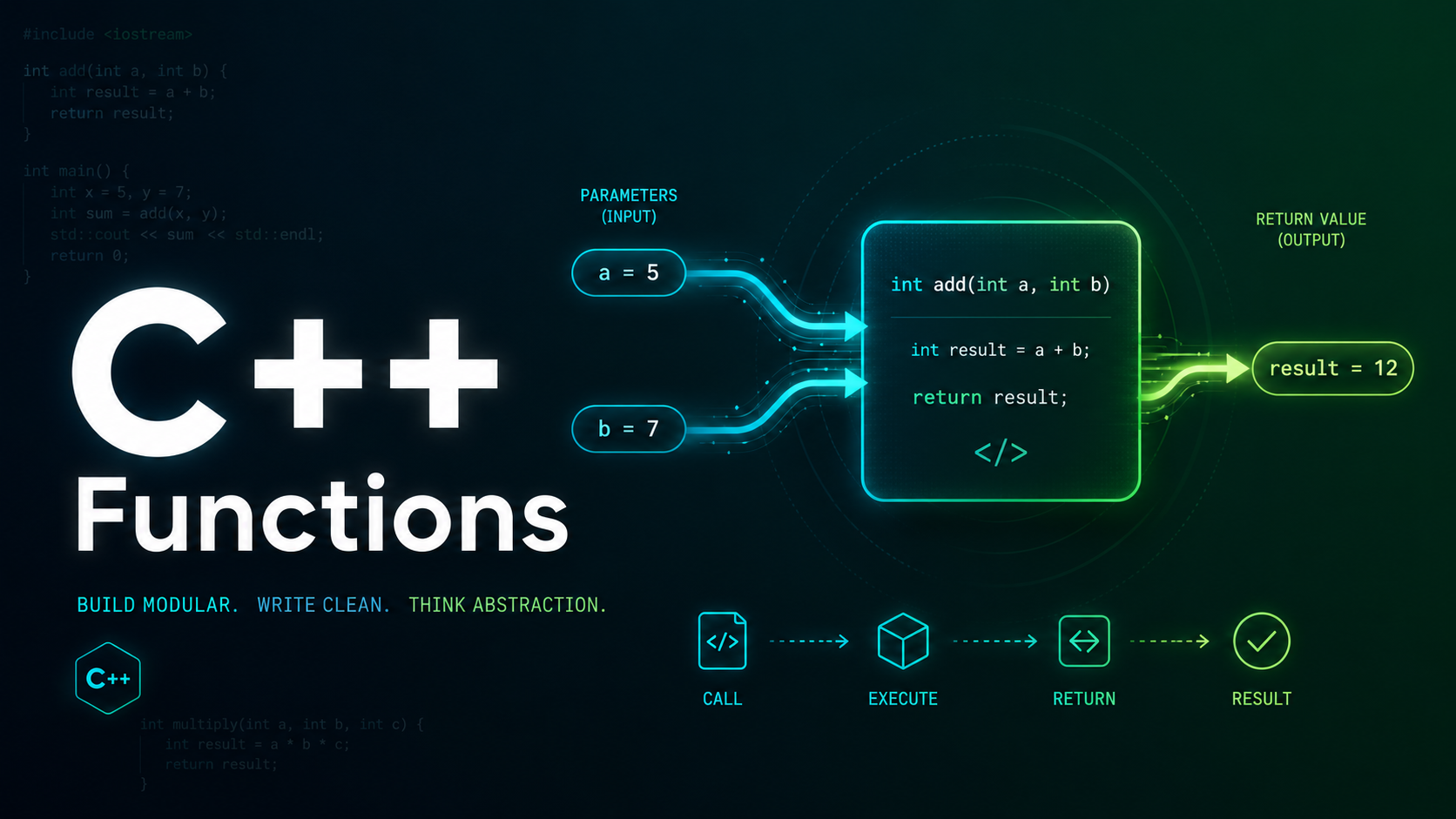
A C++ function has four parts: the return type, the name, the parameter list, and the body.
return_type function_name(parameter_list) {
    // body — the code that runs when the function is called
    return value; // if return_type is not void
}
Here is a concrete example — a function that adds two integers:
#include <iostream>
using namespace std;

int add(int a, int b) {
    return a + b;
}

int main() {
    int result = add(10, 20);
    cout << "Sum: " << result << endl;
    return 0;
}
// Output: Sum: 30
Calling a Function
To call a function, write its name followed by parentheses containing the arguments. The arguments are copied into the function’s parameters (by default — you will learn about references in a later lesson).
#include <iostream>
using namespace std;

double circle_area(double radius) {
    return 3.14159265 * radius * radius;
}

int main() {
    double r = 5.0;
    double area = circle_area(r);
    cout << "Area: " << area << endl;

    // You can also pass literals directly
    cout << "Area of r=10: " << circle_area(10.0) << endl;

    // And use the result inline
    cout << "Combined: " << circle_area(3.0) + circle_area(4.0) << endl;

    return 0;
}
When a function is called, the program jumps to the function body, executes it, and then returns to the point where it was called. The return value replaces the function call expression.
Return Types
The return type tells the compiler what kind of value the function sends back to the caller. It can be any type: int, double, string, bool, a struct, a class, or even a pointer.
#include <iostream>
#include <string>
using namespace std;

bool is_even(int n) {
    return n % 2 == 0;
}

string greet(string name) {
    return "Hello, " + name + "!";
}

char get_grade(int score) {
    if (score >= 90) return 'A';
    if (score >= 80) return 'B';
    if (score >= 70) return 'C';
    if (score >= 60) return 'D';
    return 'F';
}

int main() {
    cout << is_even(42) << endl;          // 1 (true)
    cout << greet("Alice") << endl;        // Hello, Alice!
    cout << get_grade(85) << endl;         // B
    return 0;
}
If a non-void function reaches the end without a return statement, the behavior is undefined. The compiler may warn you, but it will still compile — and the bug will bite you at runtime.
void Functions
Functions that perform an action without returning a value use the void return type. You can still use return; (without a value) to exit early.
#include <iostream>
using namespace std;

void print_separator(int width) {
    for (int i = 0; i < width; i++) {
        cout << "-";
    }
    cout << endl;
}

void print_header(string title) {
    print_separator(40);
    cout << title << endl;
    print_separator(40);
}

void validate_age(int age) {
    if (age < 0) {
        cout << "Error: age cannot be negative" << endl;
        return; // early exit
    }
    cout << "Age is valid: " << age << endl;
}

int main() {
    print_header("C++ Functions Tutorial");
    validate_age(25);
    validate_age(-5);
    return 0;
}
Parameters and Arguments
Parameters are the variables listed in the function definition. Arguments are the actual values you pass when calling the function. In C++ (by default), arguments are copied into parameters — this is called pass by value.
#include <iostream>
using namespace std;

void double_value(int x) {
    x = x * 2;  // Modifies the LOCAL copy, not the original
    cout << "Inside function: " << x << endl;
}

int main() {
    int num = 10;
    double_value(num);
    cout << "After function: " << num << endl;
    return 0;
}
// Output:
// Inside function: 20
// After function: 10  (unchanged!)
The original variable num is unchanged because double_value received a copy. To modify the original, you need pass by reference — covered in Lesson 9.
Multiple Parameters
#include <iostream>
#include <string>
#include <algorithm>
using namespace std;

// Multiple params of different types
void print_info(string name, int age, double gpa) {
    cout << name << " | Age: " << age
         << " | GPA: " << gpa << endl;
}

// Returning a computed value from multiple inputs
int clamp(int value, int low, int high) {
    if (value < low) return low;
    if (value > high) return high;
    return value;
}

double power(double base, int exponent) {
    double result = 1.0;
    for (int i = 0; i < exponent; i++) {
        result *= base;
    }
    return result;
}

int main() {
    print_info("Alice", 22, 3.85);
    cout << "Clamped: " << clamp(150, 0, 100) << endl;
    cout << "2^10 = " << power(2.0, 10) << endl;
    return 0;
}
Function Prototypes (Declarations)
In C++, you must declare a function before you call it. A function prototype (or forward declaration) tells the compiler the function’s return type, name, and parameter types — without the body.
#include <iostream>
using namespace std;

// Function prototypes (declarations)
int add(int a, int b);
void greet(string name);

int main() {
    // We can call these functions even though their
    // definitions appear BELOW main()
    cout << add(5, 3) << endl;
    greet("World");
    return 0;
}

// Function definitions
int add(int a, int b) {
    return a + b;
}

void greet(string name) {
    cout << "Hello, " << name << "!" << endl;
}
Prototypes are essential in larger projects. They go in header files (.h or .hpp) so that multiple source files can call the same function. The definition lives in one .cpp file.
Declaration vs Definition
A declaration introduces a name and its type to the compiler. A definition provides the actual implementation.
// Declaration only (no body)
int multiply(int a, int b);

// Definition (has a body)
int multiply(int a, int b) {
    return a * b;
}

// You can declare as many times as you want,
// but you can only define ONCE (One Definition Rule)
The One Definition Rule (ODR) is fundamental in C++: every function, variable, and class must have exactly one definition across the entire program (with exceptions for inline functions and templates).
Returning Multiple Values
C++ functions can only return one value directly. But there are several patterns for returning multiple values.
#include <iostream>
#include <tuple>
#include <string>
using namespace std;

// Method 1: Using a struct
struct DivResult {
    int quotient;
    int remainder;
};

DivResult divide(int a, int b) {
    return {a / b, a % b};
}

// Method 2: Using std::pair
pair<int, int> min_max(int a, int b) {
    return {min(a, b), max(a, b)};
}

// Method 3: Using std::tuple (C++11)
tuple<string, int, double> get_student() {
    return {"Alice", 22, 3.95};
}

int main() {
    // Struct
    DivResult dr = divide(17, 5);
    cout << "17/5 = " << dr.quotient << " R " << dr.remainder << endl;

    // Pair
    auto [lo, hi] = min_max(42, 17);  // C++17 structured bindings
    cout << "Min: " << lo << " Max: " << hi << endl;

    // Tuple with structured bindings
    auto [name, age, gpa] = get_student();
    cout << name << " age " << age << " gpa " << gpa << endl;

    return 0;
}
Function Scope
Variables declared inside a function (including parameters) are local to that function. They are created when the function is called and destroyed when it returns.
#include <iostream>
using namespace std;

void demo() {
    int x = 100;  // Local to demo()
    cout << "Inside demo: x = " << x << endl;
}

int main() {
    int x = 42;   // Local to main() — different variable
    demo();
    cout << "Inside main: x = " << x << endl;
    // Both variables named 'x' are completely independent
    return 0;
}
// Output:
// Inside demo: x = 100
// Inside main: x = 42
C++14 auto Return Type
In C++14 and later, you can use auto as the return type and let the compiler deduce it from the return statement.
#include <iostream>
#include <string>
using namespace std;

auto multiply(double a, double b) {
    return a * b;  // Compiler deduces return type as double
}

auto make_greeting(string name) {
    return "Hello, " + name;  // Deduces std::string
}

int main() {
    cout << multiply(3.5, 2.0) << endl;   // 7
    cout << make_greeting("Bob") << endl;  // Hello, Bob
    return 0;
}
Use auto return sparingly — it helps with templates but can make regular code harder to read if the return type is not obvious.
Trailing Return Type
C++11 introduced trailing return types with the auto func() -> type syntax. This is mainly useful in templates where the return type depends on the parameter types.
#include <iostream>
using namespace std;

// Trailing return type
auto add(int a, double b) -> double {
    return a + b;
}

// Useful in templates
template <typename T, typename U>
auto safe_add(T a, U b) -> decltype(a + b) {
    return a + b;
}

int main() {
    cout << add(5, 3.14) << endl;           // 8.14
    cout << safe_add(10, 2.5) << endl;      // 12.5
    cout << safe_add(100L, 200) << endl;    // 300
    return 0;
}
Practice Exercises
Exercise 1: Write a function int factorial(int n) that returns the factorial of n using a loop (not recursion — we will cover that in Lesson 10).
Exercise 2: Write a function bool is_palindrome(string s) that checks if a string reads the same forwards and backwards.
Exercise 3: Write a void function that prints an ASCII art box of a given width and height.
Exercise 4: Write a function that returns a struct containing the count, sum, and average of an array of integers.
Summary
Functions are the building blocks of organized code. You learned how to define functions with return types, parameters, and bodies, how to call them with arguments, how to use prototypes for forward declaration, and modern features like auto return types and structured bindings for multiple return values. In the next lesson, you will learn function overloading and default arguments — features unique to C++ that let you define multiple versions of the same function.