C++ map & set: Sorted Associative Containers Complete Guide
Table of Contents
What Are Associative Containers?
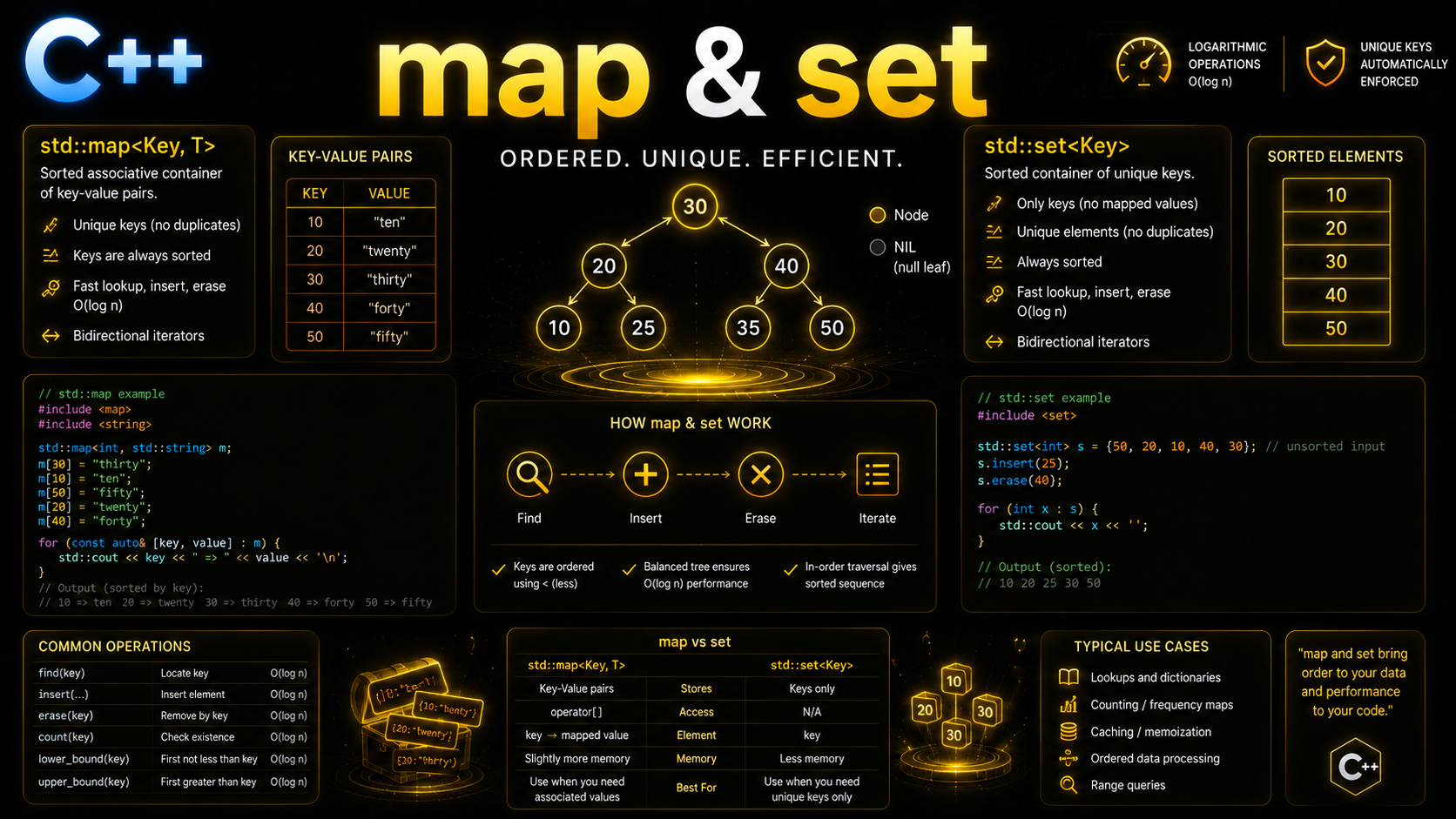
Associative containers store elements in sorted order based on keys. Unlike sequence containers like vector or list that maintain insertion order, associative containers automatically position each element according to a comparison function (defaulting to <). Internally, they use a Red-Black tree — a self-balancing binary search tree — which guarantees O(log n) insertion, lookup, and deletion.
C++ provides four sorted associative containers: std::set (unique keys), std::map (unique key-value pairs), std::multiset (duplicate keys allowed), and std::multimap (duplicate key-value pairs allowed). They all live in <set> and <map> headers respectively.
std::set — Sorted Unique Keys
std::set stores unique elements in sorted order. Attempting to insert a duplicate is silently ignored:
#include <set>
#include <iostream>
#include <string>

int main() {
    // Construction
    std::set<int> numbers = {5, 2, 8, 1, 9, 3, 2, 5};
    // Stored as: {1, 2, 3, 5, 8, 9} — sorted, duplicates removed

    // Insert
    auto [it, inserted] = numbers.insert(4);  // C++17 structured binding
    std::cout << *it << " inserted: " << inserted << "\n";  // 4 inserted: 1

    auto [it2, ins2] = numbers.insert(5);  // 5 already exists
    std::cout << *it2 << " inserted: " << ins2 << "\n";  // 5 inserted: 0

    // Emplace — construct in-place
    numbers.emplace(7);

    // Iterate — always in sorted order
    for (int n : numbers) {
        std::cout << n << " ";  // 1 2 3 4 5 7 8 9
    }
    std::cout << "\n";

    // String set — sorted alphabetically
    std::set<std::string> fruits = {"banana", "apple", "cherry", "apple"};
    for (const auto& f : fruits) {
        std::cout << f << " ";  // apple banana cherry
    }
}
set Operations
#include <set>

std::set<int> s = {1, 3, 5, 7, 9, 11, 13, 15};

// Lookup — O(log n)
auto it = s.find(7);          // returns iterator to 7
if (it != s.end()) {
    std::cout << "Found: " << *it << "\n";
}

// Count — 0 or 1 for set (useful for existence check)
if (s.count(5)) {
    std::cout << "5 exists\n";
}

// C++20: contains() — cleaner than count()
if (s.contains(5)) {
    std::cout << "5 exists\n";
}

// Erase — by value, by iterator, or by range
s.erase(3);              // remove 3: O(log n)
s.erase(s.begin());      // remove smallest: O(1) amortized
s.erase(s.find(9));      // remove 9: O(1) amortized (given iterator)

// Range queries — the power of sorted containers
auto lb = s.lower_bound(6);   // first element >= 6 → points to 7
auto ub = s.upper_bound(12);  // first element > 12 → points to 13

// Elements in range [6, 12]
for (auto it = lb; it != ub; ++it) {
    std::cout << *it << " ";  // 7 11
}

// Size
std::cout << s.size() << "\n";
std::cout << s.empty() << "\n";

// Clear
s.clear();
lower_bound and upper_bound are the reason to choose set over unordered_set. They enable efficient range queries: “give me all elements between X and Y.” Unordered containers cannot do this because elements aren’t sorted.
std::map — Sorted Key-Value Pairs
std::map stores key-value pairs sorted by key. Each key is unique:
#include <map>
#include <iostream>
#include <string>

int main() {
    // Construction
    std::map<std::string, int> ages = {
        {"Charlie", 35},
        {"Alice", 30},
        {"Bob", 25}
    };

    // Insert with operator[] — creates default if missing
    ages["Diana"] = 28;

    // Insert with insert() — doesn't overwrite existing
    ages.insert({"Alice", 99});  // ignored — Alice already exists
    std::cout << ages["Alice"] << "\n";  // still 30

    // Insert or assign (C++17) — inserts OR overwrites
    ages.insert_or_assign("Alice", 31);
    std::cout << ages["Alice"] << "\n";  // 31

    // Try emplace (C++17) — only inserts if key doesn't exist
    auto [it, ok] = ages.try_emplace("Eve", 22);
    std::cout << it->first << ": " << it->second << "\n";

    // Iterate — sorted by key
    for (const auto& [name, age] : ages) {
        std::cout << name << ": " << age << "\n";
    }
    // Alice: 31, Bob: 25, Charlie: 35, Diana: 28, Eve: 22
}
map Access Patterns
Maps offer several ways to access values, each with different behavior on missing keys:
std::map<std::string, int> scores = {{"math", 95}, {"science", 88}};

// operator[] — INSERTS default value if key missing!
int math = scores["math"];      // 95
int english = scores["english"]; // INSERTS {"english", 0} then returns 0
// scores now has 3 entries!

// .at() — throws std::out_of_range if key missing
try {
    int history = scores.at("history");  // throws!
} catch (const std::out_of_range& e) {
    std::cout << "Not found\n";
}

// .find() — returns iterator, no insertion
auto it = scores.find("math");
if (it != scores.end()) {
    std::cout << it->first << ": " << it->second << "\n";
}

// .count() — 0 or 1
if (scores.count("science")) {
    std::cout << "Science exists\n";
}

// C++20: .contains()
if (scores.contains("math")) {
    std::cout << "Math exists\n";
}

// DANGER: Using [] in a const context
void print_score(const std::map<std::string, int>& m) {
    // int s = m["math"];  // ERROR: operator[] is non-const!
    int s = m.at("math");  // OK: at() works on const maps
}
The critical lesson: operator[] silently inserts default values. This is the most common source of bugs with maps. Use .find() or .at() when you’re reading, and [] only when you want insert-or-update behavior.
Structured Bindings with Maps
C++17 structured bindings make map iteration and insert results much cleaner:
std::map<std::string, double> prices = {
    {"apple", 1.50}, {"banana", 0.75}, {"cherry", 3.00}
};

// Iteration with structured bindings
for (const auto& [fruit, price] : prices) {
    std::cout << fruit << ": $" << price << "\n";
}

// Insert result
auto [iter, success] = prices.insert({"date", 5.00});
if (success) {
    std::cout << "Inserted " << iter->first << "\n";
}

// Modify values during iteration
for (auto& [fruit, price] : prices) {
    price *= 1.10;  // 10% price increase
}

// Node extraction (C++17) — change a key without reallocating
auto node = prices.extract("apple");
if (!node.empty()) {
    node.key() = "green apple";  // change the key!
    prices.insert(std::move(node));
}
Custom Comparators
By default, set and map use std::less<Key> (the < operator). You can provide a custom comparator to change the sort order:
#include <set>
#include <map>
#include <string>

// Descending order using std::greater
std::set<int, std::greater<int>> desc = {3, 1, 4, 1, 5, 9};
// Stored as: {9, 5, 4, 3, 1}

// Case-insensitive string comparison
struct CaseInsensitive {
    bool operator()(const std::string& a, const std::string& b) const {
        return std::lexicographical_compare(
            a.begin(), a.end(), b.begin(), b.end(),
            [](char ca, char cb) { return std::tolower(ca) < std::tolower(cb); }
        );
    }
};

std::set<std::string, CaseInsensitive> names = {"Alice", "bob", "CHARLIE"};
names.insert("alice");  // rejected — "Alice" and "alice" are equal
// names contains: Alice, bob, CHARLIE (sorted case-insensitively)

// Map with custom comparator
std::map<std::string, int, CaseInsensitive> config;
config["Timeout"] = 30;
config["timeout"] = 60;  // overwrites — same key case-insensitively
std::cout << config.size() << "\n";  // 1

// Lambda comparator (C++20 makes this cleaner)
auto by_length = [](const std::string& a, const std::string& b) {
    return a.size() < b.size();
};
std::set<std::string, decltype(by_length)> by_len(by_length);
by_len.insert("hi");
by_len.insert("hello");
by_len.insert("hey");  // rejected — same length as "hi" would need tiebreaker
Your comparator must define a strict weak ordering: if comp(a, b) is true, then comp(b, a) must be false. If neither comp(a, b) nor comp(b, a) is true, the elements are considered equivalent. Violating this causes undefined behavior.
multiset and multimap
std::multiset and std::multimap allow duplicate keys:
#include <set>
#include <map>

// multiset — sorted, duplicates allowed
std::multiset<int> ms = {3, 1, 4, 1, 5, 9, 2, 6, 5, 3, 5};
// {1, 1, 2, 3, 3, 4, 5, 5, 5, 6, 9}

ms.count(5);   // 3 — three 5s
ms.count(7);   // 0

// equal_range — find all elements with a given key
auto [lo, hi] = ms.equal_range(5);
for (auto it = lo; it != hi; ++it) {
    std::cout << *it << " ";  // 5 5 5
}

ms.erase(5);   // removes ALL 5s
// Or erase just one:
auto it = ms.find(3);
if (it != ms.end()) ms.erase(it);  // removes one 3

// multimap — sorted key-value, duplicate keys allowed
std::multimap<std::string, std::string> phonebook;
phonebook.insert({"Alice", "555-1234"});
phonebook.insert({"Alice", "555-5678"});
phonebook.insert({"Bob", "555-9999"});
// phonebook["Alice"] = ...;  // ERROR: no operator[] on multimap!

// Find all numbers for Alice
auto [begin, end] = phonebook.equal_range("Alice");
for (auto it = begin; it != end; ++it) {
    std::cout << it->first << ": " << it->second << "\n";
}
// Alice: 555-1234
// Alice: 555-5678
Note that multimap does not have operator[] — it wouldn’t make sense because a key can map to multiple values. Use equal_range to find all values for a key.
Set Algorithms
The <algorithm> header provides set operations that work on any sorted range — not just std::set:
#include <algorithm>
#include <set>
#include <vector>
#include <iterator>

std::set<int> a = {1, 2, 3, 4, 5};
std::set<int> b = {3, 4, 5, 6, 7};

// Union: elements in a OR b
std::vector<int> union_result;
std::set_union(a.begin(), a.end(), b.begin(), b.end(),
               std::back_inserter(union_result));
// {1, 2, 3, 4, 5, 6, 7}

// Intersection: elements in a AND b
std::vector<int> intersect;
std::set_intersection(a.begin(), a.end(), b.begin(), b.end(),
                      std::back_inserter(intersect));
// {3, 4, 5}

// Difference: elements in a but NOT in b
std::vector<int> diff;
std::set_difference(a.begin(), a.end(), b.begin(), b.end(),
                    std::back_inserter(diff));
// {1, 2}

// Symmetric difference: elements in a OR b but NOT both
std::vector<int> sym_diff;
std::set_symmetric_difference(a.begin(), a.end(), b.begin(), b.end(),
                              std::back_inserter(sym_diff));
// {1, 2, 6, 7}

// Subset check: is a a subset of b?
bool is_subset = std::includes(b.begin(), b.end(), a.begin(), a.end());
// false — a has elements not in b
Real-World Examples
#include <map>
#include <set>
#include <string>
#include <iostream>
#include <fstream>
#include <sstream>

// Word frequency counter
void count_words(const std::string& text) {
    std::map<std::string, int> freq;
    std::istringstream stream(text);
    std::string word;
    while (stream >> word) {
        freq[word]++;  // operator[] default-inserts 0 then increments
    }
    for (const auto& [w, count] : freq) {
        std::cout << w << ": " << count << "\n";
    }
}

// Configuration store with defaults
class Config {
    std::map<std::string, std::string> data;
public:
    void set(const std::string& key, const std::string& value) {
        data[key] = value;
    }
    std::string get(const std::string& key,
                    const std::string& default_val = "") const {
        auto it = data.find(key);
        return it != data.end() ? it->second : default_val;
    }
    bool has(const std::string& key) const {
        return data.contains(key);  // C++20
    }
};

// Leaderboard — sorted scores
void leaderboard() {
    // Use map<int, string, greater> for descending scores
    std::map<int, std::string, std::greater<int>> board;
    board[95] = "Alice";
    board[88] = "Bob";
    board[92] = "Charlie";

    int rank = 1;
    for (const auto& [score, name] : board) {
        std::cout << rank++ << ". " << name << ": " << score << "\n";
    }
    // 1. Alice: 95
    // 2. Charlie: 92
    // 3. Bob: 88
}
Common Mistakes
Using [] on a const map. operator[] is non-const because it may insert. Use .at() or .find() when reading from a const map reference.
Accidental insertion with []. if (myMap[key] == something) inserts a default value for key if it doesn’t exist. Use myMap.find(key) or myMap.contains(key) instead.
Modifying set elements. Elements in a set are const — you cannot modify them through an iterator because changing a value could break the sort order. To “modify” an element, erase it and insert the new value (or use C++17 node extraction).
Assuming O(1) performance. All operations on map and set are O(log n). If you need O(1) average-case lookups and don’t need sorted order, use unordered_map or unordered_set instead.
Invalid comparator. Your comparator must be a strict weak ordering. Using <= instead of < violates this and causes undefined behavior (crashes, infinite loops).
Summary
std::set stores unique sorted keys and std::map stores unique sorted key-value pairs, both backed by Red-Black trees with O(log n) operations. multiset and multimap allow duplicate keys. Range queries with lower_bound/upper_bound are the killer feature over unordered containers. Custom comparators change the sort order. Beware of operator[]‘s silent insertion behavior on maps. In the next lesson, you’ll learn about unordered_map and unordered_set — hash-based containers that trade sorted order for O(1) average-case performance.