C++ Class Templates: Build Your Own Generic Containers
Class Templates: Building Type-Agnostic Data Structures in C++
You already know how function templates let you write a single function that works with any type. But what happens when you need an entire class — with member variables, constructors, and methods — that adapts to different types? That is exactly what class templates solve, and they are the backbone of nearly everything in the C++ Standard Library.
Every time you write std::vector<int>, std::map<std::string, double>, or std::set<Widget>, you are using a class template. In this lesson, you will learn how to build your own, handle edge cases with specialization, and leverage modern C++17 features like Class Template Argument Deduction (CTAD).
1. Basic Class Template Syntax
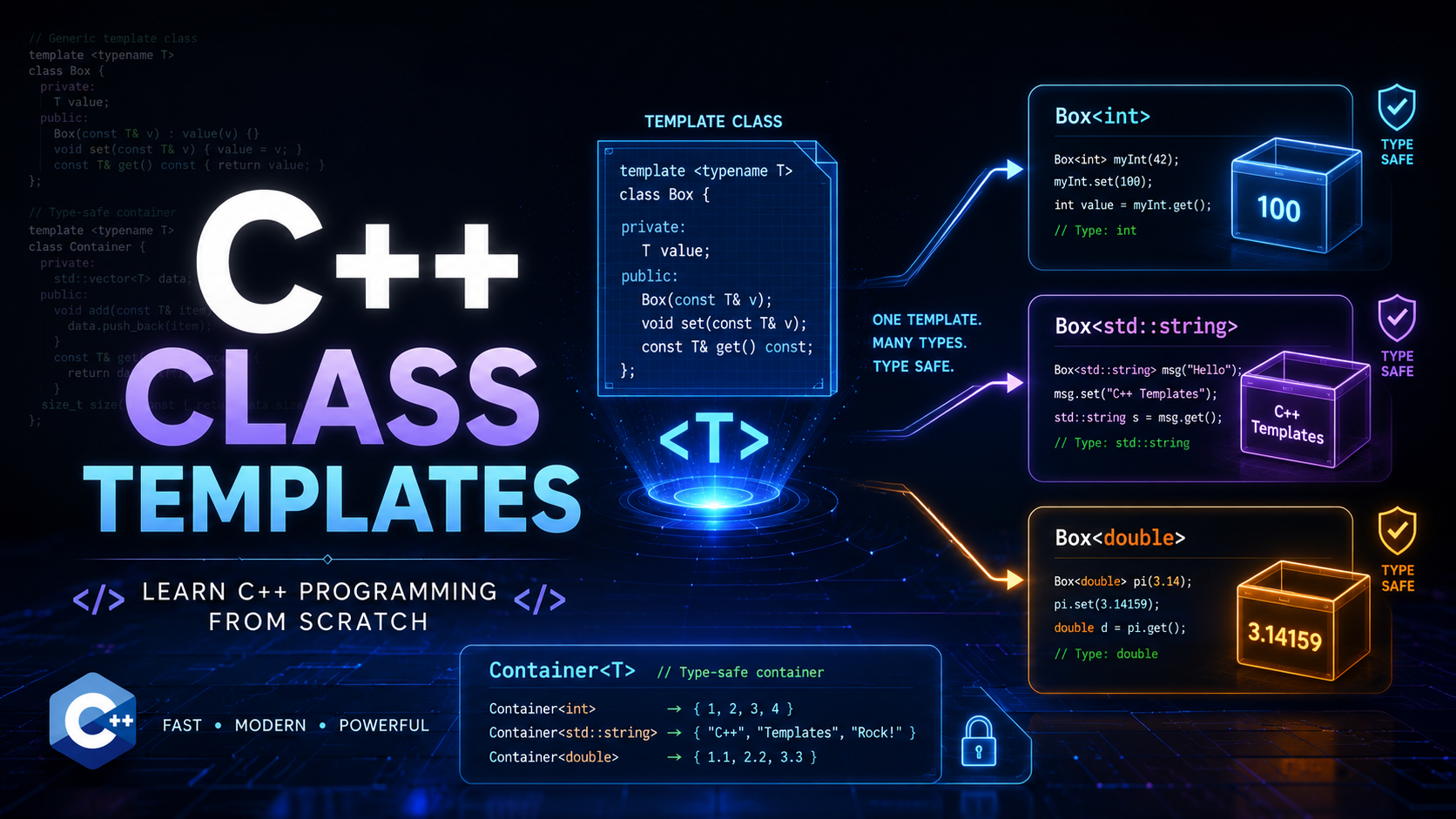
A class template begins with the template keyword followed by one or more template parameters inside angle brackets. The compiler does not generate any code from the template itself — it only generates code when you instantiate the template with concrete types.
template<typename T>
class Box {
    T value;
public:
    Box(T v) : value(v) {}
    T get() const { return value; }
    void set(T v) { value = v; }
};

int main() {
    Box<int> intBox(42);
    Box<std::string> strBox("hello");

    std::cout << intBox.get() << "\n";   // 42
    std::cout << strBox.get() << "\n";   // hello
}
Each unique instantiation — Box<int>, Box<std::string> — produces a completely separate class at compile time. They share no runtime relationship: Box<int> and Box<double> are as different as Cat and Dog. Unlike Java generics (which use type erasure), C++ templates produce fully specialized, optimized machine code for every type you use.
2. Example: A Generic Stack
Let us build a practical data structure — a stack that works with any type. If you recall how classes and objects work, this will feel natural. We are simply parameterizing the element type.
#include <vector>
#include <stdexcept>
#include <iostream>

template<typename T>
class Stack {
    std::vector<T> data;

public:
    void push(const T& val) {
        data.push_back(val);
    }

    T pop() {
        if (data.empty()) {
            throw std::runtime_error("pop() called on empty stack");
        }
        T top = data.back();
        data.pop_back();
        return top;
    }

    const T& top() const {
        if (data.empty()) {
            throw std::runtime_error("top() called on empty stack");
        }
        return data.back();
    }

    bool empty() const { return data.empty(); }
    std::size_t size() const { return data.size(); }
};

int main() {
    Stack<int> intStack;
    intStack.push(10);
    intStack.push(20);
    intStack.push(30);

    while (!intStack.empty()) {
        std::cout << intStack.pop() << " ";
    }
    // Output: 30 20 10

    Stack<std::string> strStack;
    strStack.push("C++");
    strStack.push("Templates");
    std::cout << "\n" << strStack.top();  // Templates
}
Notice how we used const T& in push() to avoid unnecessary copies. The compiler generates the correct version of every method for each type you instantiate.
3. Defining Member Functions Outside the Class
When class templates grow large, you want to separate declarations from definitions for readability. The syntax requires you to repeat the template parameter list before each member function. Critically, these definitions must remain in the header file (or be included by the translation unit that uses them) because the compiler needs to see the full definition at the point of instantiation.
// stack.h
template<typename T>
class Stack {
    std::vector<T> data;
public:
    void push(const T& val);
    T pop();
    bool empty() const;
};

// Still in stack.h — must be visible to all users
template<typename T>
void Stack<T>::push(const T& val) {
    data.push_back(val);
}

template<typename T>
T Stack<T>::pop() {
    if (data.empty()) {
        throw std::runtime_error("pop() on empty stack");
    }
    T top = data.back();
    data.pop_back();
    return top;
}

template<typename T>
bool Stack<T>::empty() const {
    return data.empty();
}
Every out-of-class definition starts with template<typename T> and uses Stack<T>:: as the scope qualifier. If you have ever done operator overloading outside a class, the pattern is similar — you just add the template prefix.
If you absolutely must separate the implementation into a .cpp file, you can use explicit instantiation:
// stack.cpp
#include "stack.h"

// Force the compiler to generate these specific instantiations
template class Stack<int>;
template class Stack<double>;
template class Stack<std::string>;
This forces the compiler to generate code for those three types in that translation unit. However, this approach is rigid — you must list every type you plan to use. For most projects, keeping definitions in the header is the pragmatic choice. See the cppreference article on class templates for the full rules.
4. Non-Type Template Parameters
Templates are not limited to types. You can parameterize on compile-time constant values — integers, enums, pointers, and (since C++20) floating-point types and literal class types. This enables data structures whose size is baked into the type itself, eliminating heap allocation entirely.
#include <iostream>
#include <stdexcept>

template<typename T, int N>
class FixedArray {
    T data[N];      // stack-allocated, size known at compile time
    int count = 0;

public:
    void add(const T& val) {
        if (count >= N) {
            throw std::overflow_error("FixedArray is full");
        }
        data[count++] = val;
    }

    T& operator[](int index) {
        if (index < 0 || index >= count) {
            throw std::out_of_range("Index out of bounds");
        }
        return data[index];
    }

    constexpr int capacity() const { return N; }
    int size() const { return count; }
};

int main() {
    FixedArray<double, 5> temps;
    temps.add(36.6);
    temps.add(37.1);
    temps.add(38.5);

    for (int i = 0; i < temps.size(); ++i) {
        std::cout << temps[i] << " ";
    }
    // Output: 36.6 37.1 38.5

    // Compile-time constant — can be used in static_assert
    static_assert(temps.capacity() == 5);
}
Here, FixedArray<double, 5> and FixedArray<double, 10> are entirely different types. You cannot assign one to the other. The STL’s std::array<T, N> uses exactly this pattern. Non-type parameters are also the foundation of powerful compile-time techniques used in libraries like Eigen for fixed-size matrix algebra.
5. Partial Specialization
Sometimes you need different behavior for a subset of types — not a single specific type, but an entire category of types. Partial specialization lets you customize a class template when the template argument matches a pattern, like “any pointer type” or “any pair of identical types.”
A classic use case: storing raw pointers in a container often requires different memory management logic than storing values. Here is how you partially specialize our Box for pointer types:
#include <iostream>

// Primary template — handles value types
template<typename T>
class SmartBox {
    T value;
public:
    SmartBox(T v) : value(v) {}
    void print() const {
        std::cout << "Value: " << value << "\n";
    }
};

// Partial specialization — handles pointer types
template<typename T>
class SmartBox<T*> {
    T* ptr;
public:
    SmartBox(T* p) : ptr(p) {}
    void print() const {
        if (ptr) {
            std::cout << "Pointer to: " << *ptr << "\n";
        } else {
            std::cout << "Null pointer\n";
        }
    }
    T& dereference() const { return *ptr; }
};

int main() {
    SmartBox<int> a(42);
    a.print();            // Value: 42

    int x = 99;
    SmartBox<int*> b(&x);
    b.print();            // Pointer to: 99
    b.dereference() = 7;
    std::cout << x;      // 7
}
The partial specialization SmartBox<T*> matches any pointer type. The compiler picks the most specific template that matches: SmartBox<int> uses the primary template, SmartBox<int*> uses the pointer specialization. This is how std::iterator_traits and many STL components handle raw pointers differently from class iterators. For the formal rules, consult the cppreference page on partial specialization.
Note that partial specialization is available for class templates but not for function templates. If you need similar behavior for functions, use overloading or if constexpr. This is a distinction worth remembering from the function templates lesson.
6. Full (Explicit) Specialization
When you need completely custom behavior for one specific type, you use full specialization. The template parameter list becomes empty — template<> — because all parameters are fixed.
#include <iostream>
#include <cstring>

template<typename T>
class Formatter {
public:
    static std::string format(const T& val) {
        return std::to_string(val);
    }
};

// Full specialization for std::string
template<>
class Formatter<std::string> {
public:
    static std::string format(const std::string& val) {
        return "\"" + val + "\"";
    }
};

// Full specialization for bool
template<>
class Formatter<bool> {
public:
    static std::string format(bool val) {
        return val ? "true" : "false";
    }
};

int main() {
    std::cout << Formatter<int>::format(42) << "\n";           // 42
    std::cout << Formatter<std::string>::format("hi") << "\n"; // "hi"
    std::cout << Formatter<bool>::format(true) << "\n";        // true
}
Full specialization rewrites the entire class for that specific type. You are not inheriting anything from the primary template — it is a clean slate. This is how the STL provides the (infamous) std::vector<bool> specialization, which packs bits instead of using one byte per element. Whether that was a good design decision is still debated.
7. Template Aliases with using
C++11 introduced template aliases, which let you create shorthand names for complex template instantiations. This dramatically improves readability in codebases that use nested templates heavily.
#include <map>
#include <string>
#include <vector>

// Simple alias — rename a specific instantiation
using StringVec = std::vector<std::string>;

// Template alias — partially bind template parameters
template<typename V>
using StringMap = std::map<std::string, V>;

// Alias for our FixedArray with a default size
template<typename T>
using SmallArray = FixedArray<T, 16>;

int main() {
    StringVec names = {"Alice", "Bob", "Charlie"};

    StringMap<int> ages;   // std::map<std::string, int>
    ages["Alice"] = 30;

    SmallArray<float> buffer;  // FixedArray<float, 16>
    buffer.add(3.14f);
}
Template aliases are strictly a compile-time convenience — they do not create new types. StringMap<int> is exactly std::map<std::string, int>, not a subclass or wrapper. This makes them zero-cost and safe to use everywhere. The cppreference page on type aliases covers the full syntax.
8. Class Template Argument Deduction (C++17)
Before C++17, you always had to specify template arguments explicitly: std::pair<int, double>(1, 3.14). CTAD lets the compiler deduce the template arguments from the constructor arguments, just like it does for function templates.
#include <vector>
#include <mutex>
#include <iostream>

// std::pair — no need for std::make_pair anymore
std::pair p(42, 3.14);        // deduced as std::pair<int, double>

// std::vector — deduced from initializer list
std::vector v = {1, 2, 3, 4}; // deduced as std::vector<int>

// std::lock_guard — deduced from mutex type
std::mutex mtx;
std::lock_guard lock(mtx);    // std::lock_guard<std::mutex>

// Works with our own templates too
template<typename T>
class Wrapper {
    T value;
public:
    Wrapper(T v) : value(v) {}
    T get() const { return value; }
};

int main() {
    Wrapper w(42);              // Wrapper<int> — CTAD in action
    std::cout << w.get();      // 42

    Wrapper s(std::string("hello")); // Wrapper<std::string>
}
CTAD works automatically when the constructor arguments unambiguously determine the template parameters. For more complex cases, you can write deduction guides:
// Deduction guide: when constructed from a C string, deduce std::string
Wrapper(const char*) -> Wrapper<std::string>;

// Now this works as expected
Wrapper greeting("hello");  // Wrapper<std::string>, not Wrapper<const char*>
CTAD eliminates a significant amount of boilerplate and is one of the most impactful quality-of-life improvements in modern C++. The cppreference CTAD page documents the full deduction rules.
9. Common Mistakes and Pitfalls
Putting template definitions in .cpp files
This is the number one mistake. If you define a template member function in a .cpp file without explicit instantiation, the linker will fail with “undefined reference” errors. The compiler needs to see the full template definition wherever it is used. Keep definitions in headers or use explicit instantiation.
Forgetting the template prefix on out-of-class definitions
// WRONG — compiler error
void Stack<T>::push(const T& val) { /* ... */ }

// CORRECT
template<typename T>
void Stack<T>::push(const T& val) { /* ... */ }
Assuming specializations inherit members from the primary template
A full specialization is a completely independent class. If the primary template has 10 methods, your specialization starts from zero — you must define every method you want available. This often catches people off guard.
Confusing partial and full specialization syntax
// Partial specialization — template parameter list is NOT empty
template<typename T>
class MyClass<T*> { /* ... */ };

// Full specialization — template parameter list IS empty
template<>
class MyClass<int> { /* ... */ };
CTAD pitfalls with brace initialization
std::vector v1(5, 0);    // vector<int> with 5 zeros — correct
std::vector v2{5, 0};    // vector<int> with elements 5 and 0 — surprise!
Brace initialization triggers initializer-list constructors, while parenthesis initialization calls regular constructors. This is not specific to CTAD, but CTAD makes the issue more visible because you no longer see the <int> to remind you what is happening.
Excessive instantiation bloat
Every unique template instantiation generates a separate copy of all the code. Stack<int>, Stack<long>, Stack<unsigned>, and Stack<short> produce four copies of every method, increasing binary size and compile times. The ISO C++ FAQ on templates discusses strategies for managing this.
10. Key Takeaways
- Class templates parameterize entire classes over types and compile-time values. Each instantiation (
Stack<int>,Stack<double>) is a distinct, independent type. - Non-type parameters like
int Nembed compile-time constants into the type, enabling stack-allocated fixed-size containers with zero overhead. - Partial specialization customizes behavior for a category of types (e.g., all pointers), while full specialization targets one specific type. Full specializations define the class from scratch.
- Member function definitions outside the class require repeating the
template<typename T>prefix and must remain in header files (or use explicit instantiation). - Template aliases (
using) create readable shorthand for complex template types at zero runtime cost. - CTAD (C++17) deduces template arguments from constructor arguments, reducing boilerplate. Custom deduction guides handle ambiguous cases.
- The entire STL —
vector,map,set,array,optional,variant— is built on class templates. Mastering this feature means understanding the library at a fundamental level. - Class templates pair naturally with concepts you have already learned: classes and objects for the structure, operator overloading to make templates feel like built-in types, and inheritance for combining polymorphism with generic programming.
Class templates are where C++ generic programming truly comes alive. In the next lessons, we will build on this foundation with variadic templates and template metaprogramming. For now, practice by building your own generic containers — a Queue<T> or a Matrix<T, Rows, Cols> will solidify these patterns quickly.