C Error Handling: errno, perror & Defensive Programming Guide
C doesn’t have try-catch blocks, exceptions, or Result types. When something goes wrong in C, you find out by checking return values — and if you don’t check, your program silently does the wrong thing. This makes C error handling both critically important and notoriously easy to get wrong.
Throughout our C Programming Roadmap, we’ve been checking return values in every example. Now it’s time to understand the full error handling system: how errno works, when to use perror() vs strerror(), and how to write programs that fail gracefully instead of crashing mysteriously.
Table of Contents
C Has No Exceptions
In Python, you write try/except. In Java, try/catch. In Rust, you use Result<T, E>. In C, you have… return values and global variables. That’s it.
// Python
try:
    f = open("file.txt")
except FileNotFoundError:
    print("File not found")

// C — no try/catch, just check returns
FILE *f = fopen("file.txt", "r");
if (f == NULL) {
    perror("file.txt");  // "file.txt: No such file or directory"
}
This means every function call that can fail must have its return value checked. Skip the check, and your program continues with invalid data, dereferencing NULL pointers, or producing garbage output — with no warning. This is both C’s greatest weakness (easy to write fragile code) and its greatest strength (zero overhead when things work).
The Return Value Convention
C library functions follow these conventions for signaling errors:
// Pointer-returning functions: return NULL on error
FILE *fp = fopen("file.txt", "r");     // NULL = error
void *p = malloc(1024);                 // NULL = error
char *s = fgets(buf, size, fp);         // NULL = error/EOF

// Integer-returning functions: return -1 or negative on error
int result = fseek(fp, 0, SEEK_SET);   // non-zero = error
int ch = fgetc(fp);                     // EOF = error/end

// Count-returning functions: return less than requested
size_t n = fread(buf, 1, 100, fp);     // n < 100 = partial/error
size_t w = fwrite(buf, 1, 100, fp);    // w < 100 = error
The pattern is consistent: check the return value, then check errno for details about what went wrong.
errno: The Global Error Code
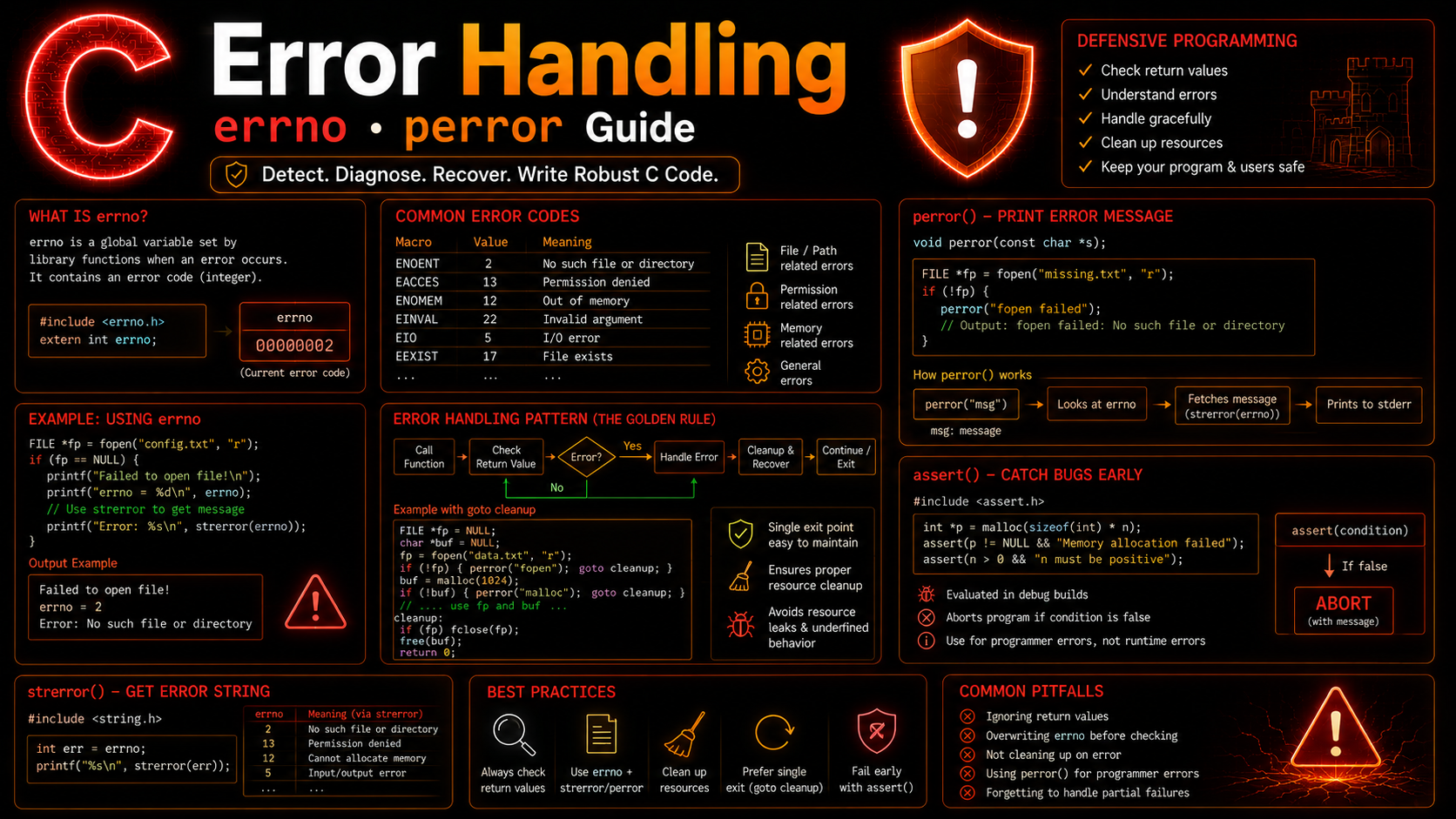
errno is a global variable (actually a macro that expands to a thread-local variable on modern systems) defined in <errno.h>. When a library function fails, it sets errno to a specific error code.
#include <stdio.h>
#include <errno.h>
#include <string.h>

int main(void) {
    FILE *fp = fopen("/nonexistent/path/file.txt", "r");

    if (fp == NULL) {
        printf("errno = %d\n", errno);           // e.g., 2
        printf("Error: %s\n", strerror(errno));   // "No such file or directory"
    }

    return 0;
}
Common errno values:
ENOENT (2)   — No such file or directory
EACCES (13)  — Permission denied
ENOMEM (12)  — Out of memory
EEXIST (17)  — File already exists
EINVAL (22)  — Invalid argument
ERANGE (34)  — Result too large (overflow)
EMFILE (24)  — Too many open files
Critical rule: errno is only meaningful immediately after a function that sets it. Successful function calls may or may not reset errno. Always check errno right after detecting an error, before calling any other functions.
// WRONG — printf() might change errno
FILE *fp = fopen("missing.txt", "r");
printf("Trying to open file...\n");  // might modify errno!
if (fp == NULL) {
    printf("Error: %s\n", strerror(errno));  // errno may be wrong now
}

// CORRECT — save errno immediately
FILE *fp = fopen("missing.txt", "r");
int saved_errno = errno;  // save it NOW
printf("Trying to open file...\n");
if (fp == NULL) {
    printf("Error: %s\n", strerror(saved_errno));  // use saved value
}
perror(): Print Error Messages
perror() prints your message followed by a colon and the system error message corresponding to the current errno:
void perror(const char *prefix);FILE *fp = fopen("config.txt", "r");
if (fp == NULL) {
perror("config.txt");
// Output: "config.txt: No such file or directory"
// or: "config.txt: Permission denied"
}perror() writes to stderr, which is the correct destination for error messages. It’s the simplest and most commonly used error reporting function in C.
strerror(): Get Error String
When you need more control over the error message format, use strerror() which returns the error string without printing it:
#include <string.h>
#include <errno.h>

FILE *fp = fopen(filename, "r");
if (!fp) {
    fprintf(stderr, "[ERROR] Cannot open '%s': %s (code %d)\n",
            filename, strerror(errno), errno);
    return -1;
}
This is useful for logging systems where you need a specific format, or when building error messages that include multiple pieces of context.
Defensive Programming Patterns
Pattern 1: Guard Clauses
// Check preconditions at the top of every function
int process_data(const char *filename, int max_records) {
    if (filename == NULL) {
        fprintf(stderr, "process_data: filename is NULL\n");
        return -1;
    }
    if (max_records <= 0) {
        fprintf(stderr, "process_data: invalid max_records %d\n", max_records);
        return -1;
    }

    FILE *fp = fopen(filename, "r");
    if (!fp) {
        perror(filename);
        return -1;
    }

    // ... main logic, knowing inputs are valid ...

    fclose(fp);
    return 0;
}
Pattern 2: Cleanup on Error (goto)
// Using goto for centralized cleanup — common in Linux kernel code
int complex_operation(const char *file1, const char *file2) {
    int result = -1;
    FILE *fp1 = NULL, *fp2 = NULL;
    char *buffer = NULL;

    fp1 = fopen(file1, "r");
    if (!fp1) { perror(file1); goto cleanup; }

    fp2 = fopen(file2, "w");
    if (!fp2) { perror(file2); goto cleanup; }

    buffer = malloc(4096);
    if (!buffer) { perror("malloc"); goto cleanup; }

    // ... do work ...

    result = 0;  // success

cleanup:
    free(buffer);
    if (fp2) fclose(fp2);
    if (fp1) fclose(fp1);
    return result;
}
This goto cleanup pattern is not bad practice — it’s the standard way to handle resource cleanup in C. The Linux kernel uses it extensively. It ensures every resource gets freed regardless of where the error occurs, as discussed in C Memory Bugs.
Pattern 3: Error Codes Enum
typedef enum {
    ERR_OK = 0,
    ERR_NULL_PARAM = -1,
    ERR_FILE_OPEN = -2,
    ERR_FILE_READ = -3,
    ERR_MEMORY = -4,
    ERR_FORMAT = -5
} ErrorCode;

const char *error_string(ErrorCode err) {
    switch (err) {
        case ERR_OK:         return "Success";
        case ERR_NULL_PARAM: return "NULL parameter";
        case ERR_FILE_OPEN:  return "Cannot open file";
        case ERR_FILE_READ:  return "Cannot read file";
        case ERR_MEMORY:     return "Out of memory";
        case ERR_FORMAT:     return "Invalid format";
        default:             return "Unknown error";
    }
}

ErrorCode load_config(const char *path) {
    if (!path) return ERR_NULL_PARAM;

    FILE *fp = fopen(path, "r");
    if (!fp) return ERR_FILE_OPEN;

    // ...
    fclose(fp);
    return ERR_OK;
}
Error Propagation
Since C has no exceptions, errors must be propagated manually up the call chain:
// Low-level function
int read_record(FILE *fp, Record *r) {
    if (fread(r, sizeof(Record), 1, fp) != 1) {
        return -1;  // propagate error up
    }
    return 0;
}

// Mid-level function
int process_file(const char *filename) {
    FILE *fp = fopen(filename, "rb");
    if (!fp) return -1;

    Record r;
    int err = read_record(fp, &r);
    if (err != 0) {
        fclose(fp);
        return err;  // propagate up again
    }

    // ... process record ...
    fclose(fp);
    return 0;
}

// Top-level function
int main(void) {
    int err = process_file("data.bin");
    if (err != 0) {
        fprintf(stderr, "Failed to process file (error %d)\n", err);
        return EXIT_FAILURE;
    }
    return EXIT_SUCCESS;
}
Every level must check and forward errors. This is verbose but explicit — you always know exactly what happens on every error path. There are no hidden control flow jumps like exceptions cause.
setjmp/longjmp: Poor Man’s Exceptions
<setjmp.h> provides a mechanism for non-local jumps — essentially, a way to “throw” back to a saved point:
#include <stdio.h>
#include <setjmp.h>

jmp_buf error_handler;

void risky_function(void) {
    // Something goes wrong
    longjmp(error_handler, 1);  // "throw" error code 1
    // Code after longjmp never executes
}

int main(void) {
    int error = setjmp(error_handler);  // "try"

    if (error == 0) {
        // Normal path — like try block
        risky_function();
        printf("This never prints\n");
    } else {
        // Error path — like catch block
        printf("Caught error: %d\n", error);
    }

    return 0;
}
Warning: setjmp/longjmp is dangerous. It skips all cleanup code between the longjmp call and the setjmp point, causing resource leaks. It doesn’t work well with C Dynamic Memory Allocation because allocated memory won’t be freed. Use it sparingly — the goto cleanup pattern is almost always better.
Assertions: assert()
assert() from <assert.h> checks conditions that should never be false. If the condition fails, it prints a diagnostic message and terminates the program:
#include <assert.h>

void sort_array(int *arr, int size) {
    assert(arr != NULL);     // programmer error if NULL
    assert(size > 0);        // programmer error if negative

    // ... sort logic ...
}

// If assertion fails:
// "Assertion failed: arr != NULL, file sort.c, line 4"
Use assert() for conditions that indicate bugs in your code, not runtime errors. A missing file is a runtime error (use if + perror). A NULL pointer where one should never be is a bug (use assert).
Assertions can be disabled in release builds by defining NDEBUG:
// Compile with: gcc -DNDEBUG program.c
// All assert() calls become no-ops
Complete Example: Robust File Processor
#include <stdio.h>
#include <stdlib.h>
#include <string.h>
#include <errno.h>
#include <assert.h>

typedef enum {
    PROC_OK = 0,
    PROC_ERR_ARGS,
    PROC_ERR_OPEN,
    PROC_ERR_READ,
    PROC_ERR_MEMORY,
    PROC_ERR_FORMAT
} ProcError;

const char *proc_strerror(ProcError err) {
    switch (err) {
        case PROC_OK:         return "Success";
        case PROC_ERR_ARGS:   return "Invalid arguments";
        case PROC_ERR_OPEN:   return "Cannot open file";
        case PROC_ERR_READ:   return "Read error";
        case PROC_ERR_MEMORY: return "Out of memory";
        case PROC_ERR_FORMAT: return "Invalid file format";
        default:              return "Unknown error";
    }
}

ProcError process_csv(const char *filename) {
    if (!filename) return PROC_ERR_ARGS;

    FILE *fp = NULL;
    char *line = NULL;
    ProcError result = PROC_OK;

    fp = fopen(filename, "r");
    if (!fp) {
        fprintf(stderr, "Cannot open '%s': %s\n", filename, strerror(errno));
        return PROC_ERR_OPEN;
    }

    line = malloc(1024);
    if (!line) {
        result = PROC_ERR_MEMORY;
        goto cleanup;
    }

    int line_num = 0;
    int records = 0;

    while (fgets(line, 1024, fp) != NULL) {
        line_num++;
        line[strcspn(line, "\n")] = '\0';

        if (line_num == 1) continue;  // skip header

        char name[50];
        int age;
        float score;

        if (sscanf(line, "%49[^,],%d,%f", name, &age, &score) != 3) {
            fprintf(stderr, "Warning: malformed line %d: '%s'\n", line_num, line);
            continue;  // skip bad lines, don't abort
        }

        printf("Record %d: %s (age %d, score %.1f)\n", ++records, name, age, score);
    }

    if (ferror(fp)) {
        result = PROC_ERR_READ;
        goto cleanup;
    }

    printf("\nProcessed %d records from %d lines\n", records, line_num);

cleanup:
    free(line);
    if (fp) fclose(fp);
    return result;
}

int main(int argc, char *argv[]) {
    if (argc != 2) {
        fprintf(stderr, "Usage: %s <csv_file>\n", argv[0]);
        return EXIT_FAILURE;
    }

    ProcError err = process_csv(argv[1]);
    if (err != PROC_OK) {
        fprintf(stderr, "Error: %s\n", proc_strerror(err));
        return EXIT_FAILURE;
    }

    return EXIT_SUCCESS;
}
Best Practices
Check every return value. If a function can fail, check it. No exceptions. The most common source of C bugs is unchecked return values.
Use perror() for system errors. When fopen(), malloc(), or other system functions fail, perror() gives the most informative error message with minimal code.
Save errno immediately. If you need errno after the failing call, save it before calling anything else.
Use goto for cleanup. It’s not bad practice in C — it’s the standard pattern for ensuring all resources are freed on error paths, as used in the Linux kernel coding style.
Use assert() for impossible conditions. Assertions catch programmer errors during development. Use if statements for expected runtime errors (file missing, bad input).
Define error code enums. For your own libraries and modules, define named error codes instead of using magic numbers. This makes debugging much easier, similar to how C Unions and Enums give names to constants.
Summary
C error handling relies on return values, errno, and disciplined checking. Use perror() for quick error reporting, strerror() for custom formatting, assert() for catching bugs, and the goto cleanup pattern for resource management. It’s more verbose than exceptions, but it gives you complete control with zero overhead. In our final lesson of this batch, we’ll cover command-line arguments — how to make your C programs accept input from the terminal.